Timing that fits the product.
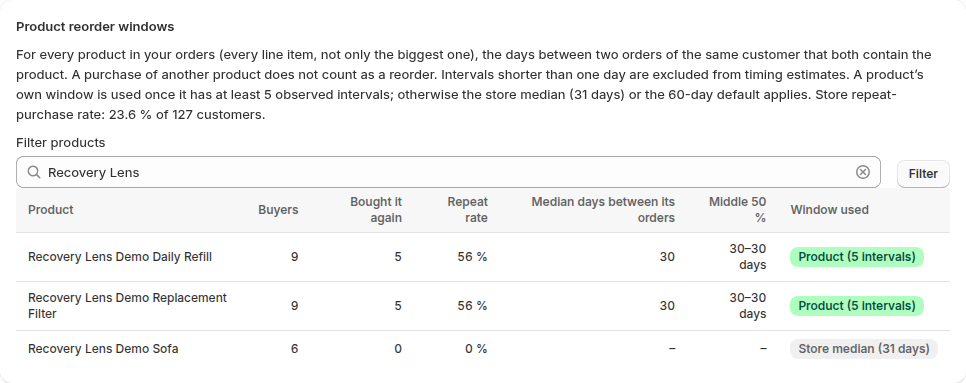
See median and 25th–75th percentile reorder windows for every product. Product windows need five observed repeat intervals; otherwise the store median or a disclosed 60-day fallback applies.
A big purchase can stall on one unanswered question. Send reassurance about financing, warranty, delivery, returns or specialist help, using your own confirmed answers. Compare recovery with a random holdout to estimate the extra orders.
Install from the Shopify App StoreBuilt-in email, Klaviyo, Omnisend, Flow & webhooks.
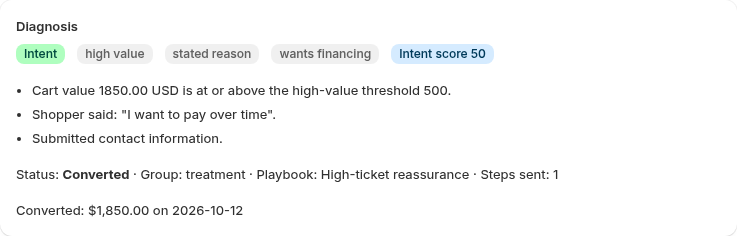
A shopper asked to pay over time. The rules explain the decision; your own financing answers shape the follow-up. View full screenshot ↗ · What to send instead of a discount
Now included / product-aware win-back
See median and 25th–75th percentile reorder windows for every product. Product windows need five observed repeat intervals; otherwise the store median or a disclosed 60-day fallback applies.
Filter due, overdue and long-lapsed buyers by score, product, purchase count and tags. Consent is refreshed before freezing. Already-running cohorts and service holds are excluded. Sample-size and duration advice show what your volume can support.
Compare incremental orders, revenue and estimated gross margin with 95% confidence intervals. Flag holdout email/SMS exposure and win-back discount use. Contaminated buyers stay in the assigned groups; incomplete checks and early stops remain visible.
Order imports cover up to the last 2 years of orders once you approve the order-history permission in Shopify. Until then, imports cover orders created in the last 60 days, so scores and reorder windows use limited history. Unit costs are used where available; otherwise your fallback margin applies. Other channels can contaminate a holdout. List sync never subscribes or unsubscribes anyone; configure your messaging consent and exclusion rules before sending.
01 / Product reorder timing
Inspect repeat rates and observed reorder intervals for every product. Transparent recoverability scores and exclusions distinguish due, overdue and long-lapsed buyers.
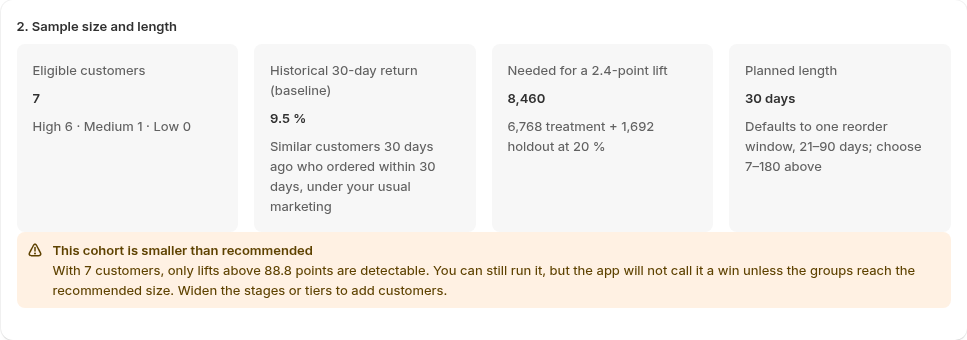
02 / Frozen win-back cohorts
Preview your cohort, its historical baseline and sample-size needs. This deliberately tiny demo shows the warning you get when volume cannot support a reliable conclusion.
The doubt behind the abandoned cart
For a considered purchase, “come back and save 10%” can miss the question that matters. And a cart without contact details is not a reachable shopper.
“a generic 10%-off abandoned-cart email is worse than nothing”
“most of my cart abandoners never left an email or phone”
Community voices about the problem, not Recovery Lens customer testimonials.
One decision layer. Your existing workflow.
Read checkout and order signals, with an optional web pixel and shopper answers. See likely intent, timing, friction and bot-like activity. A rule is an inference, not a confirmed reason.
Set a high-value threshold and recovery delays. Add your confirmed financing, warranty, delivery, returns and specialist answers. Suppress poor-fit recovery and shoppers without the required consent.
Send checkout playbooks with built-in email, or route to Klaviyo, Omnisend, Flow or a signed webhook. Compare all eligible checkouts in their assigned treatment and holdout groups, even if a message never reaches them.
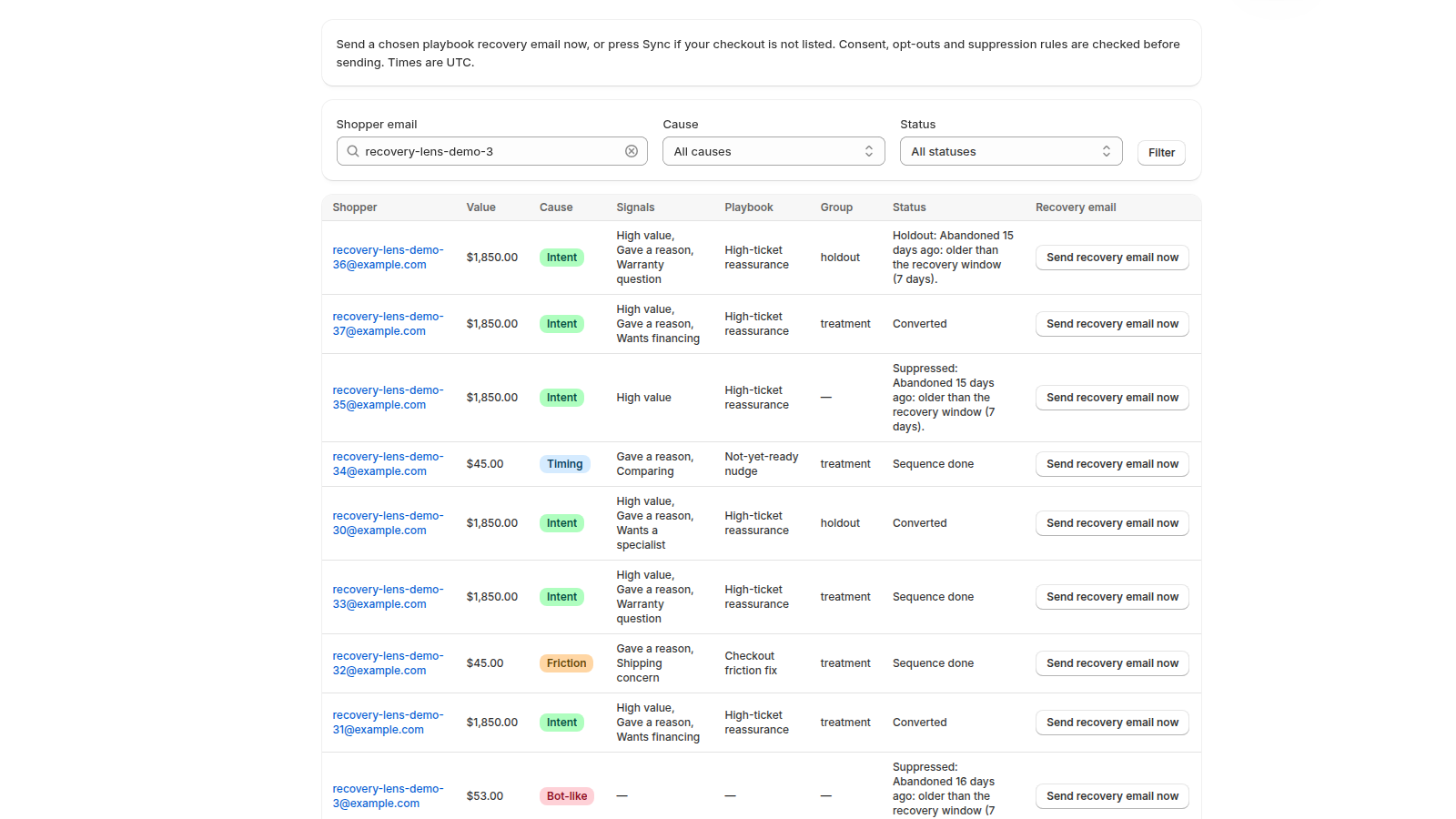
01 / The checkout queue
See the cause, signals, playbook and suppression decision together. A bot-like checkout and a shopper comparing options should not get the same treatment.
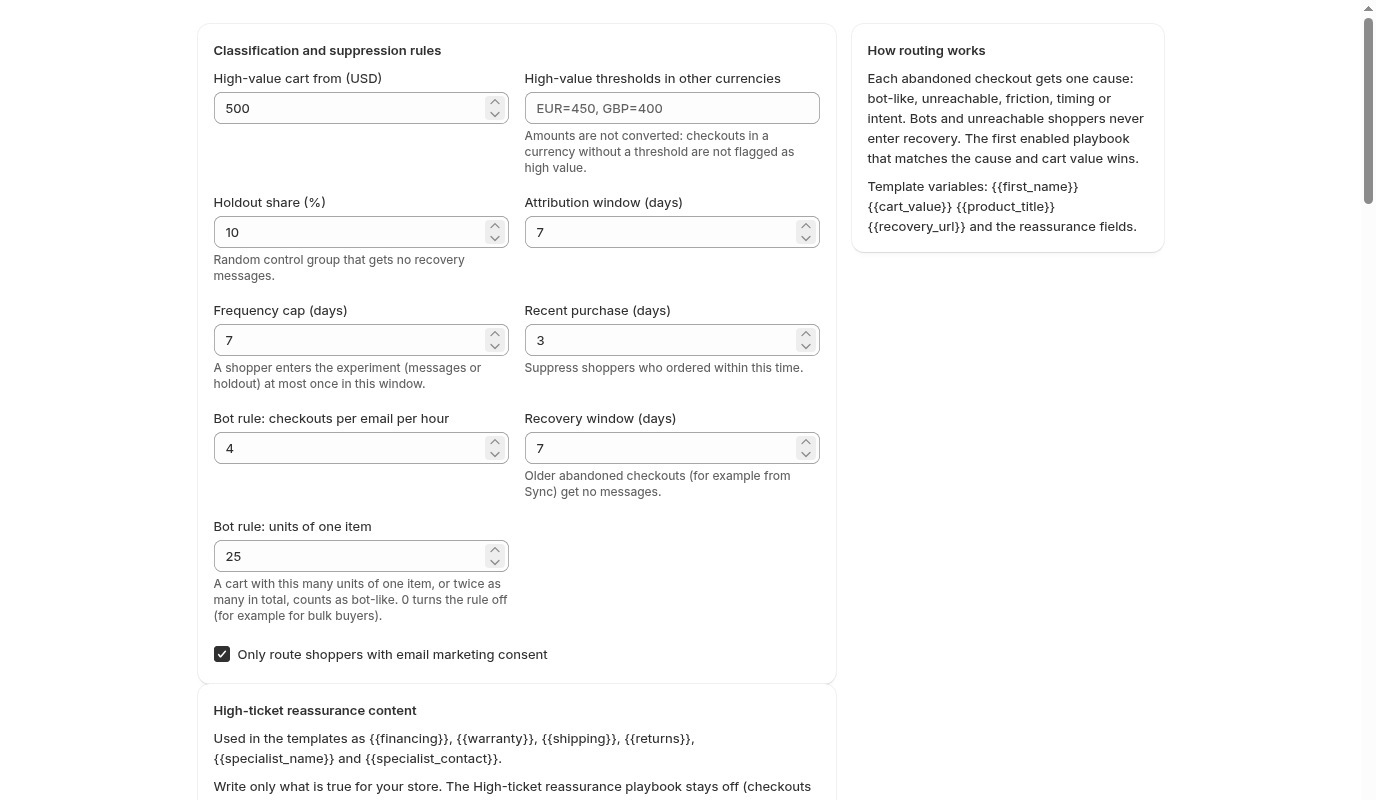
02 / Your recovery rules
Set delays, thresholds and holdout size. Add your own financing, warranty, shipping and specialist answers. Reassurance stays off until you confirm that content is accurate.
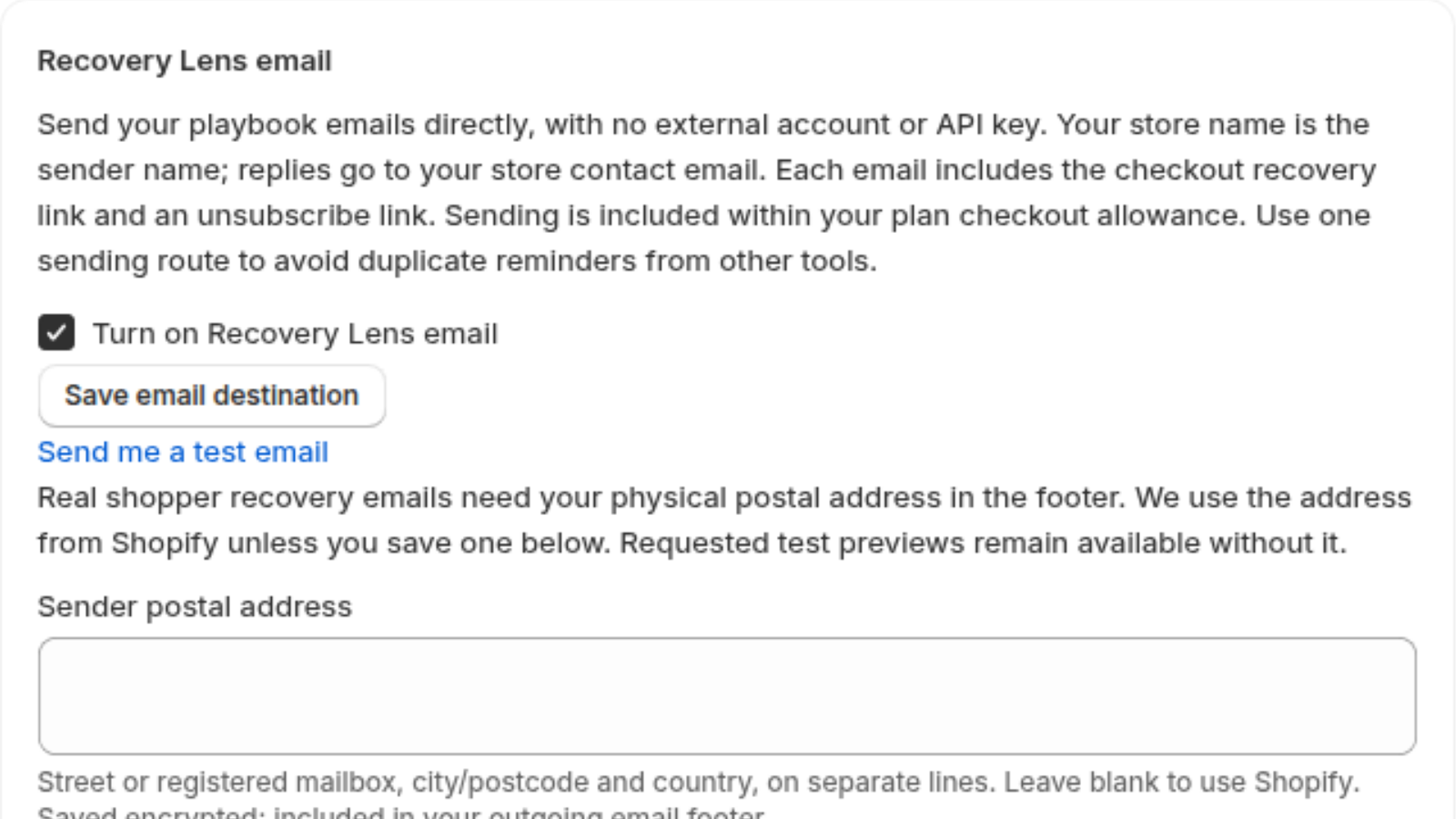
03 / Choose your destination
Use built-in Recovery Lens email without an external account, or route events to Klaviyo, Omnisend, Shopify Flow or a signed webhook. Send a real test from Playbooks.
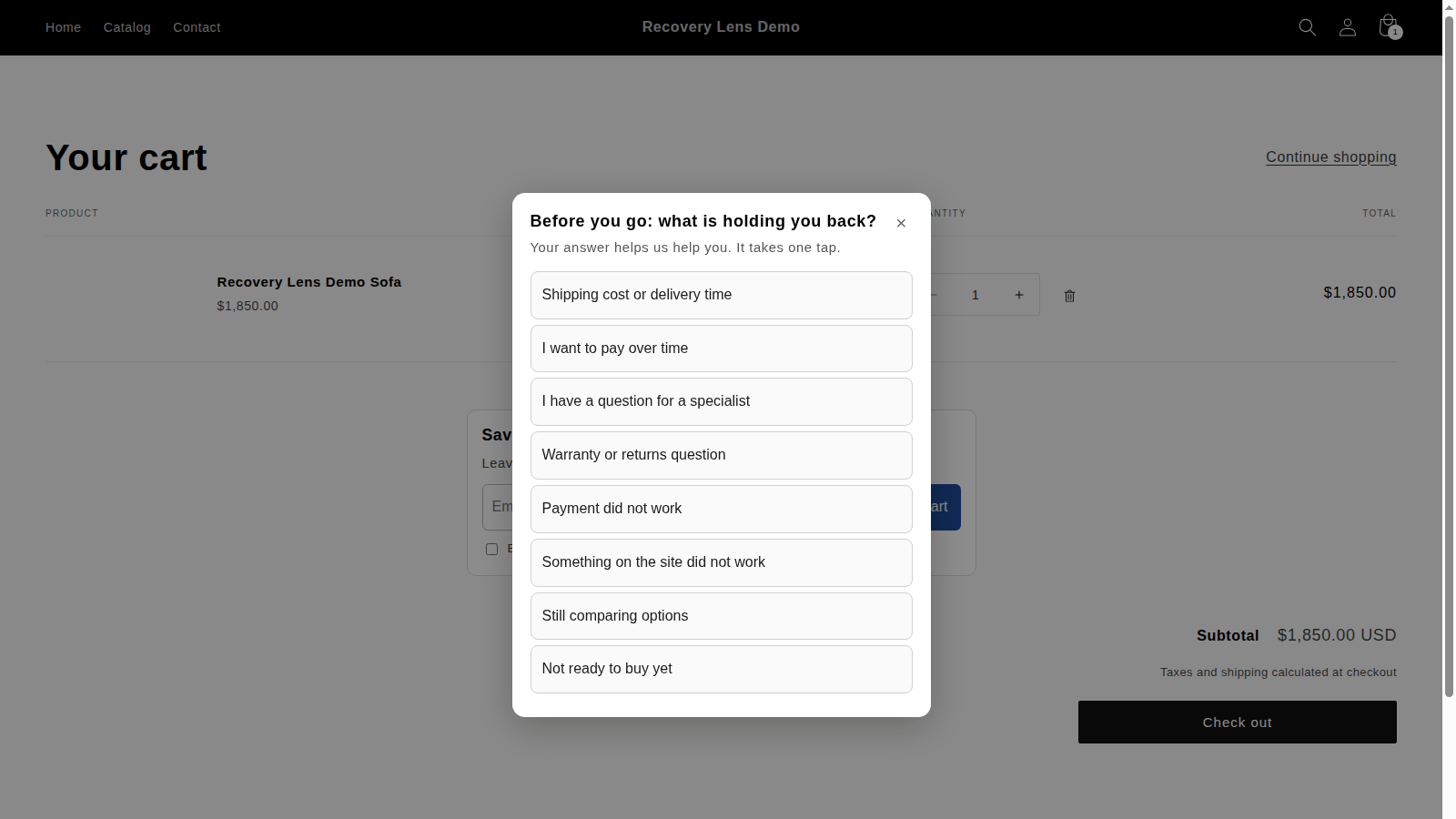
04 / Optional storefront signals
The theme embed asks what is holding them back. Its separate ‘Save your cart’ form can capture an email with explicit opt-in before checkout.
Evidence before a victory lap
A sale after a reminder is not proof the reminder caused it. Recovery Lens compares treatment with a random holdout, counting all assigned eligible checkouts in each group — including those that did not receive a step.
Steady checkout volume matters. The report stays in “Collecting data” until each group has 30 checkouts. This is a first reading, not guaranteed statistical significance. Start before your next big sale to gather more observations.
Flat pricing. No share of recovered revenue.
Both plans include direct recovery email, checkout classification, suppression, reassurance playbooks, destinations, product reorder analysis and win-back lift reports. Every plan has a 14-day free trial. Existing merchants keep their current plan unless they choose to change.
$29 USD / 30 days
1,000 routed checkouts / calendar month
2 running win-back tests · cohorts up to 5,000
14-day free trial · Shopify billing
$79 USD / 30 days
10,000 routed checkouts / calendar month
Unlimited running win-back tests · cohorts up to 50,000
14-day free trial · Shopify billing
No automatic overages. Classification continues at your limit; new shoppers are suppressed from routing until next month or an upgrade. Built-in recovery email is included within the checkout allowance. External messaging provider fees are separate.
Before you start
Recovery works best when your sending flows and your holdout agree on who gets contacted.
Yes. Turn on Recovery Lens email to send your saved playbook directly, with your store name, your store contact email for replies, the checkout link and an unsubscribe link. No external account or key is needed. Real shopper sends include your valid postal address from Shopify or Destinations; requested test previews remain available during setup. Overview and Checkouts have Send test email: enter any address and click once, even before choosing a plan. Checkouts has Send recovery email now with exact blocking reasons and a Send as test fallback; Playbooks keeps Send me a test email. Automatic delays start at 1 minute; new installs keep the 60-minute default. SMS and win-back campaigns use your own messaging tools.
Yes, with configuration. Use Recovery Lens events to start the matching follow-up and use its Suppressed event to exclude eligible holdout or suppressed contacts from existing recovery flows. Other reminders can contaminate the comparison, so configure exclusions before starting a holdout. API keys and provider automation setup are yours.
No. List sync preserves provider consent; Shopify consent is checked before cohort creation and export. Your messaging tool must enforce its own consent. You configure treatment delivery and holdout exclusions. CSV and Flow options are also available.
The report includes 95% confidence intervals, sample-size checks and contamination warnings. Gross margin uses available unit costs or your disclosed fallback percentage; it does not include all business costs. Small or early tests may stay inconclusive.
No. Recovery needs an identified shopper and the required consent. The optional theme embed offers ‘Save your cart’ with an explicit opt-in; it does not identify unknown visitors behind the scenes.
Consent is required by default. Recovery Lens checks the current Shopify consent state before dispatch; an explicit opt-out stops recovery. An opt-in captured by the app applies only to that email. You remain responsible for your messaging settings and applicable requirements.
No. Recovery Lens uses the Shopify admin, a web pixel and an optional theme app embed. It does not add a survey inside the checkout steps. Shopify Flow availability and your provider’s features depend on their own requirements.
The report says ‘Collecting data’ until there are at least 30 checkouts in both treatment and holdout. That is a minimum for a first reading, not proof of a reliable uplift. At a 10% holdout you need roughly 300 eligible checkouts just to reach 30 held out; a convincing result can need much more.
Classification continues. New shoppers are suppressed from routing until the next calendar month or an upgrade. There are no automatic overage charges. New Growth includes two running win-back tests with cohorts up to 5,000; Scale includes unlimited tests up to 50,000. New tests above a plan limit are blocked; existing reports stay available.
See what is worth recovering
Install Recovery Lens to diagnose abandoned checkouts, send recovery emails and measure checkout recovery and win-back tests against a holdout.
Start a 14-day free trial. Growth $29 or Scale $79 USD / 30 days.
No revenue promises.